How to Get the Fanvue Verified Badge
Fanvue Verified Badge = 2–3x more subs. Post on X/IG with @fanvue #FanvueVerifiedBadge → email link → get blue tick free in 3–7 days. Do it now!

One white checkmark changes everything on Fanvue.
No badge = visitors think “scam, bot, or underage” and leave.
With badge = instant trust, 2–3x more subscribers, and way higher tips. (even without lots of likes)
Real example: One AI creator got verified and jumped from $2k to $7k in the same week.
Important: This is NOT the basic KYC (the private ID check you need to get paid).
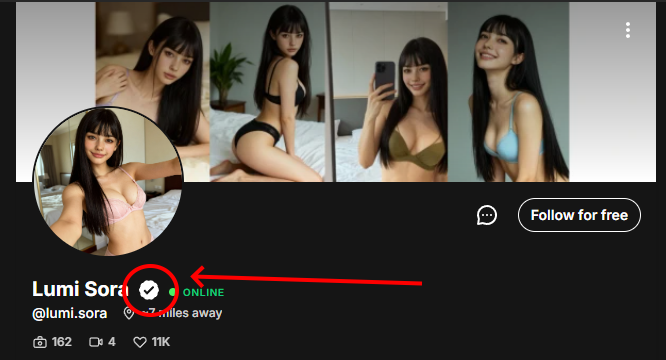
The Verified Badge is the public white tick that shows on your profile. It is optional, free, and the fastest way to look like a top 1% creator.
This guide gives you the exact process Fanvue uses in 2025 (works for AI and human creators).
Follow it word for word and get approved in 3–7 days.
Your white tick is waiting. Let’s grab it now.
The Exact 4-Step Process to Get Your Verified Badge
This is not automatic like Instagram. Fanvue makes you earn it with a quick marketing push.
Do these 4 steps exactly and your blue tick appears on your profile: boosting trust and subs instantly.
1. Create and post a promotional announcement on X (Twitter) or Instagram
- Write a simple post: "Just joined @fanvue! Excited to share exclusive content with you all 🔥 Check my link in bio for fun surprises 😘 #FanvueVerifiedBadge"
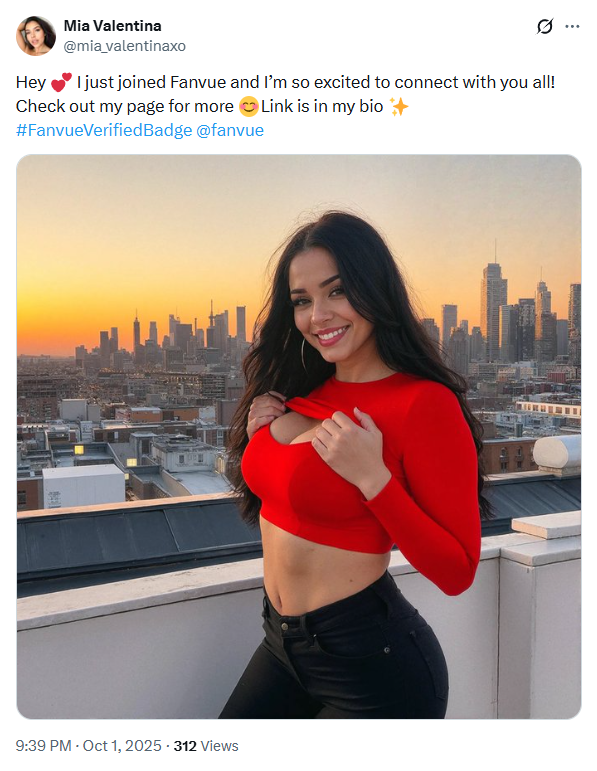
- Attach a safe photo: Smiling headshot, bikini tease, or outfit pic (NO nudity: Instagram/X bans adult images fast)
2. Add the mandatory tags so they can track it
- Always include @fanvue (tag them directly), even if you are managing multiple Fanvue accounts for different personas.
- And #FanvueVerifiedBadge (exact hashtag), a move that boosts authority and prepares you to eventually become a Fanvue Ambassador.
- Post publicly from your main social account (the one with 1k+ followers)
- Why? Fanvue wants proof you are real and promoting them. This builds credibility and ensures you don't end up needing a Fanvue media under review fix for identity issues.

- No tags = no review. They search these to find your post.
3. Audit your Fanvue profile for full compliance (and boost conversions too)
- Check bio: Clear AI disclaimer if needed ("100% AI-generated, 18+ only")
Plop this in the bottom of your bio:
All content provided through this profile – including but not limited to text, images, videos, audio, designs, and any other digital materials – is fully protected under copyright law and related intellectual property rights. Any reproduction, distribution, modification, resale, or public sharing of these materials, in whole or in part, without prior written permission from the creator, is strictly prohibited. Such actions may lead to legal consequences under applicable copyright and intellectual property legislation.

By purchasing, subscribing to, or otherwise accessing this content, you explicitly acknowledge and agree that you are acquiring AI-generated digital content. All materials are provided solely for personal and non-transferable use. Access does not grant ownership of the content but a limited, private license to view and enjoy it.

By proceeding with a purchase or subscription, you confirm your full acceptance of these terms and agree not to copy, redistribute, or share any of the materials in any form.- Content: No violations (no underage props like teddy bears/Hello Kitty, no public nudity)
- Settings: Age 18+, NSFW marked correctly, 20+ photos uploaded
- Why? They review your whole page. One red flag = rejection.
Join 500+ creators in AI Model Factory – your no-BS Skool playbook for faceless riches.
What's Inside (Proven System):
- IG Growth Hacks: Viral reels with 550k+ views, DM funnels, ban-proof posting.
- AI Images/Videos Mastery: Create stunning influencers in hours using free tools (no Photoshop needed).
- ComfyUI Guide: Step-by-step setup + prompts for consistent, hyper-real models (beginner-friendly).
- Fanvue Guide: Launch, verify AI accounts, PPV pricing, chatting masterclass.
Real students hit $5k week 1
Learn More →
4. Email the direct link to support and request the badge
- Go to support@fanvue.com
Send them this email: (copy & paste)
Subject: Verified Badge Request – Promo Post Link Included

Hi team, I just posted my Fanvue announcement on [X/Instagram]. Link: [paste direct post URL]. My Fanvue username is [@yourhandle]. Please review and add my Verified Badge. Thanks!- Content: No violations (no underage props like teddy bears/Hello Kitty). This is the best way to stay safe while making Fanvue NSFW content.
- Attach screenshot of the post if asked.
- They review in 3–7 days and add it if clean. Getting this badge is a great way to show is AI OFM profitable for creators who treat this like a real business.
Important: This is 100% free. Ignore any "buy verification" scams – they steal your money and info.
Do these steps today and watch your profile convert like crazy. A verified badge is also very helpful for getting your first sub on Fanvue because fans will trust that you are a real creator. Next: How the badge changes your earnings forever.
Conclusion
The Verified Badge is the cheapest, fastest way to double or triple your subscribers in 2025, offering better ROI than moving to other Fanvue alternatives.
Four simple steps:
- Post your announcement on X or Instagram to generate buzz and get Fanvue likes
- Tag @fanvue + #FanvueVerifiedBadge
- Clean your profile to show you know how to create AI model for Fanvue correctly
- Email the link to support to officially verify Fanvue account status
Do it once, for free, and the blue checkmark stays forever.
Creators without it fight for every sub. Creators with it look like top 1% and cash in on autopilot by applying top Fanvue tips.
Send that email today. Your badge (and next $10k–$50k month) is waiting, just like the results from a top AI OnlyFans course.